
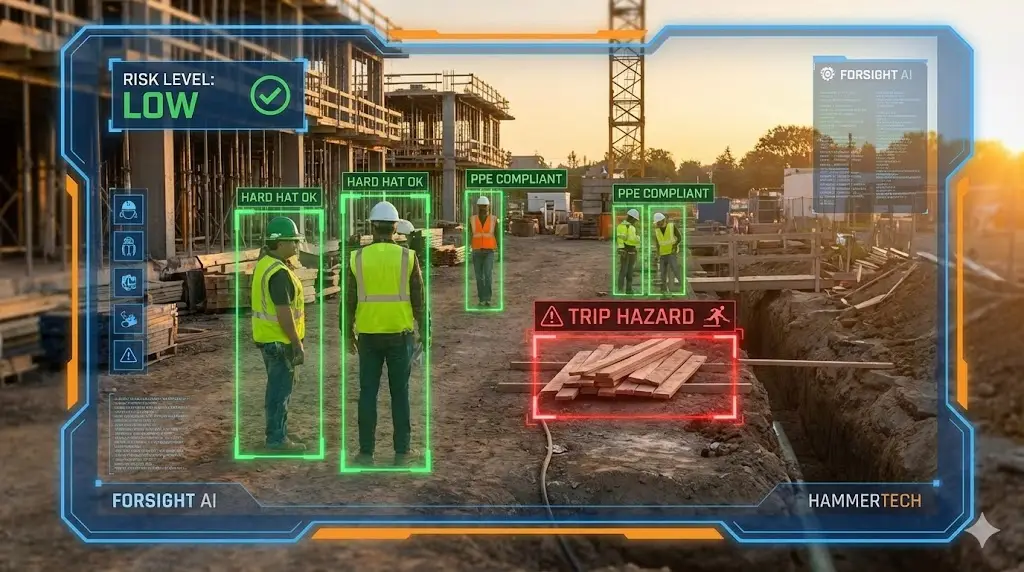
In construction, safety is the difference between a profitable job and a lawsuit that shuts you down. Yet, many sites still rely on reactive clipboards and hope. To proactively manage risk in 2026, forward-thinking contractors are turning to the best AI safety apps. These tools change safety from a weekly walkthrough to 24/7 automated monitoring.
In 2026, the best AI safety apps have fundamentally changed how contractors manage risk. Instead of waiting for an accident to happen, these tools use predictive analytics and computer vision to stop incidents before they occur.
According to recent 2026 industry reports, construction firms implementing AI-driven safety systems have seen accident rates drop by 45-70% within the first 18 months. Even more compelling for the bottom line, these companies report an average ROI of 340%, largely driven by reduced insurance premiums and avoided litigation costs.
Here are the top 3 AI tools that are helping GCs and subcontractors lower their EMR (Experience Modification Rate) and save thousands on insurance premiums this year.
Top 3 Best AI Safety Apps for Construction
1. HammerTech (Best for Compliance & Predictive Data)
HammerTech has become the gold standard for General Contractors who need to manage safety at scale. It moves every permit, induction, and inspection from paper to a centralized cloud platform.
- The AI Advantage: Predictive Safety: HammerTech doesn’t just record data; it learns from it. Its “Predictive Safety” engine analyzes thousands of data points from your past projects. If it notices a trend—for example, that ladder slips increase by 15% on days with high humidity—it alerts your site superintendent to hold a specific toolbox talk on ladder safety before the shift begins.
- Best Feature: Digital Inductions: Gone are the days of hour-long orientation meetings in a cramped trailer. Workers complete their safety orientation and sign-ins via their smartphones before they even arrive at the gate. The AI instantly verifies their certifications, flagging anyone whose OSHA 30 or specialized license has expired.
- Pricing: Custom enterprise pricing (typically per project or per annual revenue).
- Best For: Large General Contractors managing dozens of subcontractors.
2. Forsight (Best for Visual Monitoring)
While HammerTech handles the paperwork, Forsight handles the eyes on the ground. It turns your existing security cameras into proactive AI safety managers.
- The AI Advantage: Computer Vision: Forsight connects to your standard CCTV cameras and uses AI to “watch” the site 24/7. It can distinguish between a worker, a vehicle, and a piece of equipment. If a worker enters a “Danger Zone” (like the swing radius of a crane) or is detected without a hard hat or high-vis vest, the system sends a real-time alert to the foreman’s phone.
- Best Feature: Fire & Smoke Detection: Traditional smoke detectors are useless on an open, windy jobsite. Forsight’s AI can visually detect the early signs of smoke or fire often hours before a thermal sensor would trigger, potentially saving millions in property damage.
- Integrations: seamlessly embeds into Procore, allowing you to view safety alerts without leaving your project management dashboard.
- Best For: Commercial projects with tower cranes, heavy equipment, or high security needs.
3. Salus (Best for Ease of Use)
Salus is built for the field worker, not the office executive. If your crew hates technology, this is the app to choose.
- The AI Advantage: Voice-to-Form: Salus removes the friction of typing on a small screen with dirty gloves. A foreman can simply speak into the app: “We are digging a trench 6 feet deep near the north gas line.” The AI transcribes the voice note and automatically populates the correct “Job Hazard Analysis” (JHA) form, ensuring 100% compliance with zero typing.
- Best Feature: Digital ID Scanning: Instead of manually checking physical cards, a safety officer can scan a worker’s ID badge with their phone. The app instantly pulls up their entire training history, medical alerts, and emergency contact info.
- Offline Mode: Crucial for remote sites, Salus works fully offline. It syncs all data to the cloud the moment the device reconnects to Wi-Fi.
- Best For: Subcontractors (Electrical, Plumbing, HVAC) and mid-sized crews.
Why You Need AI Safety Apps in 2026
Investing in the best AI safety apps isn’t just about avoiding OSHA fines; it’s a financial strategy.
- Lower Insurance Premiums: Insurance carriers love data. By showing an underwriter that you use AI monitoring to track PPE compliance and hazards, you can often negotiate significantly lower premiums for your General Liability and Workers’ Comp policies.
- Defensible Evidence: In the litigious construction world, false injury claims are common. AI video footage and timestamped digital logs provide undeniable proof that your site was compliant and safety protocols were followed, protecting you from fraudulent lawsuits.
- The “EMR” Effect: Your Experience Modification Rate (EMR) dictates your ability to bid on large government and commercial jobs. AI helps keep your incident rate low, ensuring your EMR stays below 1.0 so you can keep winning contracts.
Buyer’s Guide: Features to Look For
When evaluating safety software, ensure it checks these three boxes:
- Offline Capability: Construction sites often have spotty cell service. The app must allow workers to fill out forms offline and sync later. (Salus and HammerTech do this well).
- Multilingual Support: Your workforce likely speaks multiple languages. The best AI tools automatically translate safety forms and alerts into Spanish, Portuguese, or French, ensuring every worker understands the risks.
- Integration: It should talk to your existing tools. If you use Procore or Autodesk Build, make sure your safety app integrates so you aren’t entering data twice.
Frequently Asked Questions (FAQ)
Q: Will AI replace safety managers?
A: No. AI acts as a “force multiplier.” It allows one safety manager to effectively monitor five sites at once by highlighting exactly where the risks are, rather than spending their day driving between sites just to check paperwork.
Q: Is facial recognition legal on jobsites?
A: It depends on your state. However, most AI safety tools (like Forsight) offer “face blurring” features that detect PPE compliance (like hard hats) without storing biometric data on individual workers’ faces, keeping you compliant with privacy laws.
Q: How much do these apps cost?
A: Salus typically charges per user (approx. $15-$25/user/month). HammerTech and Forsight usually charge a percentage of project volume or a flat site fee, which is standard for enterprise software.
Summary: Which Tool is for You?
- For General Contractors (Compliance & Trends): Use HammerTech.
- For Visual Monitoring (Cranes & heavy sites): Use Forsight.
- For Subcontractors (Simple & Fast): Use Salus.
Next Step: Now that your physical jobsite is safe, you need to ensure your digital assets are secure. Read our guide on Is AI Safe for Client Data? to protect your business from cyber liability.